The Ultimate Guide to Using Smart Plugs in Your Home
The advent of smart home technology has transformed the way we interact with our living spaces, and among the most accessible and impactful devices are smart plugs. These unassuming gadgets, plugging directly into your existing wall outlets, unlock a world of convenience, energy savings, and advanced control over your appliances. Whether you’re looking to automate your morning routine, reduce your electricity bill, or simply gain peace of mind, understanding smart plugs is the first step toward a more intelligent home.
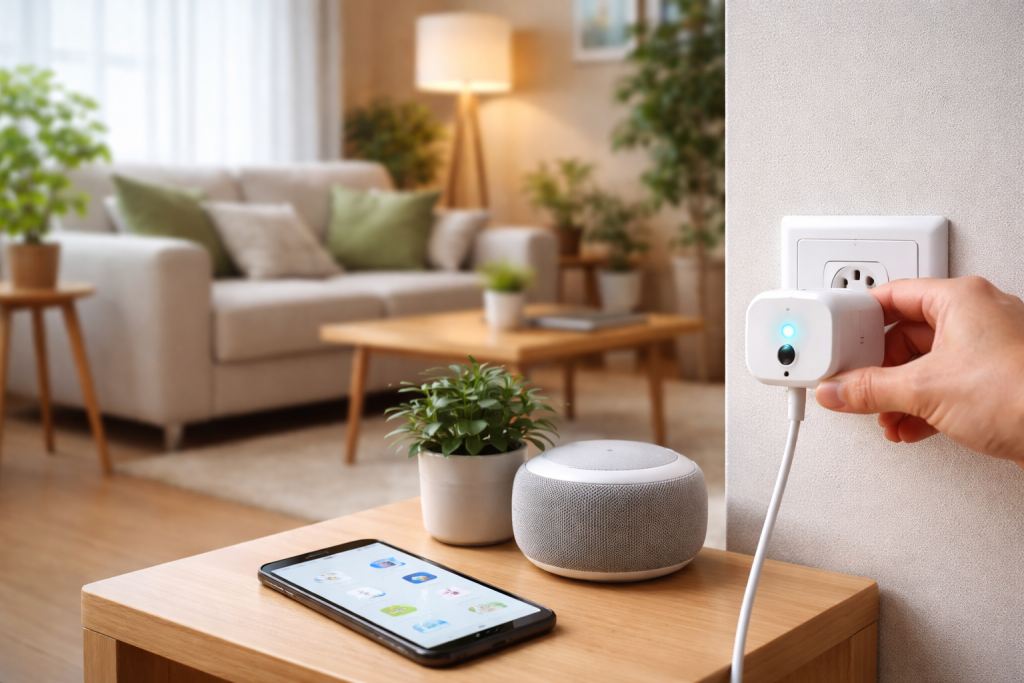
At their core, smart plugs are essentially adapters that add connectivity to traditional electrical devices. They bridge the gap between your standard lamps, fans, coffee makers, and other plugged-in appliances and your home’s Wi-Fi network. This connection allows you to control these devices remotely, schedule their operation, and even monitor their energy consumption, all through a smartphone app or voice commands.
The magic behind a smart plug lies in its internal circuitry. When plugged into a wall socket, it provides power to whatever device is connected to it, just like a regular plug. However, it also contains a wireless communication module, typically Wi-Fi, and a microcontroller. This microcontroller allows the plug to receive and interpret commands from your smart device or network. When you send a command, such as turning a lamp on, the smart plug receives this instruction over your Wi-Fi network, processes it, and then acts as a switch, either completing or breaking the electrical circuit to the connected appliance. The range of functionality can vary, with some smart plugs offering basic on/off control, while others boast advanced features like dimming capabilities, energy monitoring, and even scene creation.
Contents
- 1 The Basic Functionality
- 2 Connectivity and Communication Protocols
- 3 The Role of the Mobile App
- 4 Compatibility with Your Ecosystem
- 5 Features and Functionality
- 6 Design and Size
- 7 Downloading the App and Creating an Account
- 8 Connecting to Your Wi-Fi Network
- 9 Pairing the Smart Plug with the App
- 10 Scheduling On and Off Times
- 11 Creating Scenes and Routines
- 12 Geofencing for Location-Based Control
- 13 Accessing Controls from Anywhere
- 14 Checking Device Status
- 15 Energy Consumption Tracking
- 16 Voice Control with Alexa, Google Assistant, and Siri
- 17 Building a Comprehensive Smart Home
- 18 IFTTT (If This Then That) for Advanced Automations
- 19 Consolidate Your Power Strips
- 20 Use Them for Holiday Decorations
- 21 Create a “Vacation Mode”
- 22 Optimize for Energy Savings
- 23 Don’t Forget About Maintenance
The Basic Functionality
The primary purpose of a smart plug is to grant you on-demand control over any device plugged into it. This means you can turn things on or off from anywhere with an internet connection. Imagine leaving for work and suddenly realising you forgot to turn off the iron. With a smart plug, you can simply open your app and switch it off remotely, saving you a trip back home and potentially preventing a fire hazard. Or, consider waking up to a perfectly brewed pot of coffee; you can schedule your coffee maker to start brewing just before your alarm goes off.
Connectivity and Communication Protocols
Smart plugs primarily communicate wirelessly, most commonly using Wi-Fi. Your home’s Wi-Fi router acts as the central hub, allowing your smartphone or voice assistant to send commands to the smart plug. Some smart plugs also utilise other communication protocols like Zigbee or Z-Wave. These protocols are often associated with dedicated smart home hubs or bridges, which can offer enhanced reliability and a more robust network for your smart devices. While Wi-Fi is convenient due to its ubiquity, devices using Zigbee or Z-Wave might require an additional hub for operation but can sometimes offer better battery life for battery-powered sensors and a more meshed network.
The Role of the Mobile App
The accompanying mobile application is the central command centre for your smart plug. Available for both iOS and Android devices, these apps provide an intuitive interface for managing your plugs. Through the app, you can typically name your plugs (e.g., “Living Room Lamp”, “Fan”), toggle them on and off, set schedules, create routines, and access advanced features like energy monitoring. The app translates your digital commands into signals that your smart plug can understand and execute.
With a plethora of options on the market, selecting the ideal smart plug can feel overwhelming. The best choice for your home depends on your specific needs, existing smart home ecosystem, and budget.
Compatibility with Your Ecosystem
One of the most crucial factors to consider is compatibility with your existing smart home setup. If you already use Amazon Alexa, Google Assistant, or Apple HomeKit, looking for smart plugs that are certified to work with these platforms will ensure seamless integration. This means you can control your smart plugs with simple voice commands like “Alexa, turn on the desk lamp” or “Hey Google, dim the bedroom lights.”
Features and Functionality
Beyond basic on/off control, smart plugs offer a range of additional features. Do you want to track your energy consumption for specific appliances? Look for plugs with built-in energy monitoring. Are you interested in dimming certain lights? Some smart plugs are designed to control dimmable lights. Consider the types of devices you intend to plug into them. Some high-power appliances might require heavy-duty smart plugs.
Energy Monitoring Capabilities
For those conscious of their electricity bills and environmental impact, energy monitoring is a game-changer. Smart plugs with this feature can track the power consumption of connected devices in real-time, giving users helpful insights via their app. You can identify which appliances are energy vampires and make informed decisions to reduce your overall energy usage. This data can be presented in graphs and reports, making it easy to understand your home’s energy habits.
Heavy-Duty vs. Standard Plugs
When choosing smart plugs, it’s essential to consider the power requirements of the devices you’ll be connecting. Standard smart plugs are suitable for most common household electronics like lamps, fans, and small appliances. However, for high-draw devices such as space heaters, hair dryers, or power tools, you’ll need to opt for heavy-duty smart plugs that are rated to handle higher wattages and amperages to prevent overheating and potential hazards. Always check the power rating of your appliance and the smart plug to ensure they are compatible.
Design and Size
Smart plugs are not just about functionality; their physical design matters too. Some plugs are designed to be compact and discreet, ensuring they don’t obstruct adjacent outlets. Others might have integrated features like USB ports, offering added versatility. Consider the aesthetics and how the smart plug will fit into your home’s decor and layout. Some models are also built for outdoor use, featuring weatherproofing for controlling garden lights or holiday decorations.
The setup process for most smart plugs is remarkably straightforward, designed to be user-friendly even for those new to smart home technology. Typically, it involves a few simple steps using your smartphone.
Downloading the App and Creating an Account
The first step is to download the manufacturer’s dedicated app from your smartphone’s app store. Once installed, you’ll usually be prompted to create an account, which allows the app to manage your devices and sync settings across different platforms. This account also enables remote access to your smart plugs when you’re away from home.
Connecting to Your Wi-Fi Network
After creating your account, the app will guide you through the process of connecting the smart plug to your home’s Wi-Fi network. This usually involves putting the smart plug into pairing mode, often by pressing a button on the plug itself, and then following the on-screen instructions within the app. You’ll typically need to select your Wi-Fi network name (SSID) and enter your Wi-Fi password. Ensure your smartphone is connected to the same Wi-Fi network you intend to use for the smart plug.
Pairing the Smart Plug with the App
Once the smart plug is powered on and in pairing mode, the app will discover and connect to it. This process can vary slightly between brands. Some apps will automatically detect the plug, while others might require you to select a device from a list. Once paired, you’ll be able to name your plug, assign it to a specific room in your virtual home setup, and begin controlling it.
The true power of smart plugs lies in their ability to automate everyday tasks, making your home more convenient and efficient. By setting schedules and creating routines, you can transform how you interact with your appliances.
Scheduling On and Off Times
One of the most common uses for smart plugs is to set schedules for your devices. You can program your coffee maker to start brewing at 7:00 AM, have your living room lamp turn on at sunset, or ensure your fans automatically switch off at bedtime. This not only adds convenience but can also contribute to energy savings by ensuring devices are only running when needed. Schedules can be customised for weekdays, weekends, or specific days of the week.
Creating Scenes and Routines
Many smart plug apps allow you to create “scenes” or “routines”, which are groups of actions that can be triggered by a single command or event. For example, you could create a “Good Morning” scene that turns on your bedroom lamp, starts your coffee maker, and turns on the kitchen lights. Similarly, a “Goodnight” routine could turn off all connected lights and appliances. These routines streamline your daily activities and enhance the “smart” experience of your home.
Triggering Automations
Events beyond a time schedule can trigger automations. Some smart plugs, when integrated with other smart home devices, can react to motion detection, door opening, or even changes in outside temperature. For instance, a smart plug connected to a fan could automatically turn on if a connected temperature sensor detects the room exceeding a certain degree. This level of interconnectedness creates a truly responsive living environment.
Geofencing for Location-Based Control
Geofencing is a feature that uses your smartphone’s GPS to trigger actions based on your location. You can set up geofencing so that your smart plugs automatically turn off when you leave a certain radius around your home and turn back on when you approach it. This adds an extra layer of convenience and security, ensuring you never leave your lights or appliances on unnecessarily.
The ability to monitor and control your home’s connected devices from afar provides unparalleled peace of mind and convenience. Smart plugs make this a reality for a wide range of appliances.
Accessing Controls from Anywhere
With a smartphone and an internet connection, you can access and control your smart plugs from virtually anywhere in the world. You can check your devices’ status and turn them on or off while working, on vacation, or running errands. This remote access is invaluable for managing your home’s energy consumption, ensuring security, and adapting to unexpected situations.
Checking Device Status
The smart plug app provides a real-time status update for each connected device. You can see at a glance whether a particular appliance is on or off, which is particularly useful for ensuring you haven’t left anything running by mistake. This visual confirmation offers a sense of control and security over your home’s electrical devices.
Energy Consumption Tracking
As mentioned earlier, smart plugs with energy monitoring capabilities allow you to track the electricity usage of connected devices. This data can be accessed remotely, enabling you to review your energy consumption patterns even when you’re not at home. You can identify high-consumption devices, understand their usage over time, and make informed decisions to optimise your energy efficiency.
The true potential of smart plugs is realised when they are integrated into a broader smart home ecosystem, particularly with voice assistants and comprehensive smart home platforms.
Voice Control with Alexa, Google Assistant, and Siri
The convenience of voice control is a major draw for many smart home users. By linking your smart plugs to platforms like Amazon Alexa, Google Assistant, or Apple HomeKit, you can control your devices with simple spoken commands. This hands-free operation is perfect for situations where your hands are occupied or when you want to make quick adjustments without reaching for your phone.
How to Link Smart Plugs to Voice Assistants
The process of linking smart plugs to voice assistants usually involves enabling the relevant skill or service within the voice assistant’s app. You’ll typically need to log into your smart plug manufacturer’s account within the voice assistant’s ecosystem, granting permissions for control. Once linked, your voice assistant will be able to discover and control your smart plugs.
Building a Comprehensive Smart Home
Smart plugs are fundamental building blocks for creating a cohesive smart home. They can work in tandem with other smart devices, such as smart bulbs, smart thermostats, security cameras, and smart sensors, to create more sophisticated automations and a truly integrated living experience. For example, a smart door sensor could trigger smart plugs to turn on specific lights when the door is opened, or a smart smoke detector could be programmed to shut off ventilation fans via smart plugs.
Using Smart Home Hubs
While many smart plugs connect directly to your Wi-Fi, for a more robust and scalable smart home, you might consider using a smart home hub. Hubs act as a central controller, simplifying management and often enabling more complex interactions between devices that use different communication protocols like Zigbee or Z-Wave. This can lead to a more reliable and extended range for your smart devices.
IFTTT (If This Then That) for Advanced Automations
For users who want to push the boundaries of automation, services like IFTTT (If This Then That) offer powerful customisation options. IFTTT allows you to create applets that connect different apps and services, including your smart plugs, based on triggers. For example, you could create an applet that turns on your smart plug connected to a fan if the weather forecast predicts a certain temperature or turns off all smart plugs when your phone’s battery reaches a low percentage.
To truly unlock the full potential of your smart plugs, consider these tips and tricks that go beyond basic operation.
Consolidate Your Power Strips
If you have multiple devices plugged into a single power strip, consider replacing it with a smart plug connected to the strip. This allows you to control all devices plugged into that strip collectively with a single command or schedule, simplifying management and enhancing energy control.
Use Them for Holiday Decorations
Smart plugs are perfect for automating your holiday lights and decorations. You can set them to turn on and off automatically, create dazzling light shows, or even sync them with music, all from your smartphone. This saves you the hassle of manually plugging and unplugging them, especially for hard-to-reach outlets.
Create a “Vacation Mode”
To make your home appear occupied while you’re away, you can set your smart plugs to turn lights on and off at random intervals or according to a predetermined schedule. This can deter potential intruders and provide peace of mind. Some apps even have dedicated “vacation modes” that simulate occupancy.
Optimize for Energy Savings
Beyond just scheduling, actively monitor energy consumption with smart plugs. Identify appliances that are frequently left on unnecessarily or are particularly power-hungry, and create specific automations to reduce their usage. This includes setting devices to turn off after a certain period of inactivity or when you’re not home.
Don’t Forget About Maintenance
Periodically check for firmware updates for your smart plugs and their associated apps. Manufacturers often release updates to improve performance, enhance security, and introduce new features. Ensuring your devices are up-to-date will guarantee you’re getting the most out of your smart plug investment. By understanding and implementing these strategies, you can transform your ordinary home into an intelligent, efficient, and convenient living space, powered by the humble yet mighty smart plug.

GoLiveXora is managed by a passionate content creator dedicated to helping people improve their everyday lives through practical knowledge and modern solutions.