
From Cluttered to Neat: How to Declutter and Organize Your Tech Accessories Like a Pro
The constant buzz of technology in the modern world is accompanied by a veritable avalanche of accessories. From the ubiquitous charging cables and power banks to earbuds, adapters, hard drives, and a plethora of dongles we barely understand, our tech ecosystem can quickly transform from a marvel of modern convenience into a chaotic jumble. This chaos chaos not only looks unsightly but can also lead to frustration, wasted time searching for lost items, and even damage to our precious devices due to mismanaged power sources. It’s time to reclaim control and transform your tech accessory landscape from cluttered to neat, achieving a level of organisation that even the most seasoned tech professional would envy.
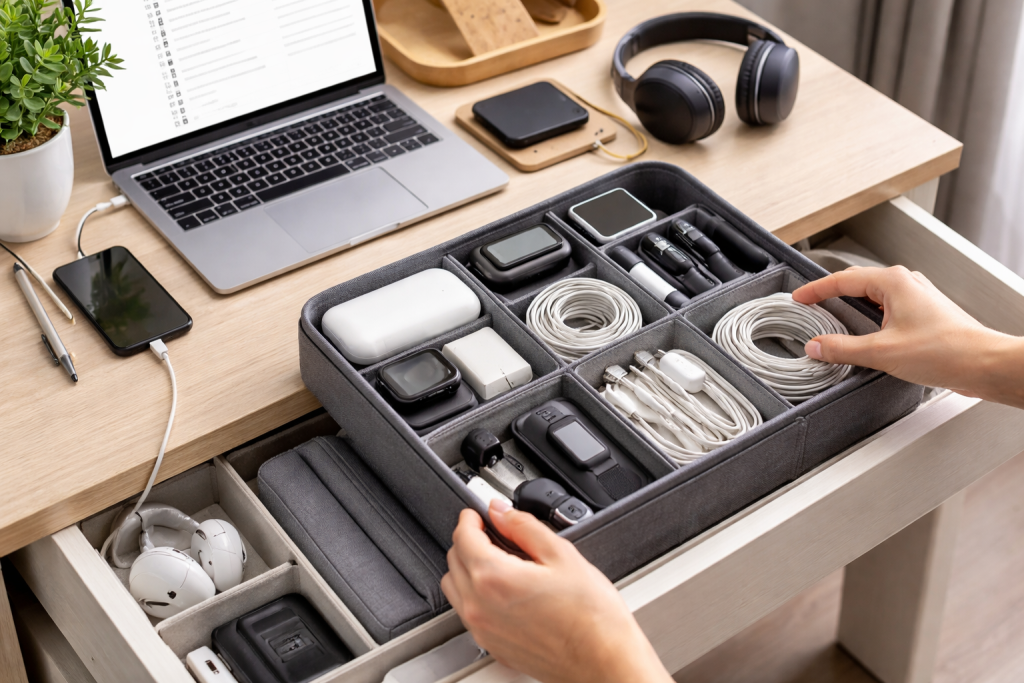
In our increasingly digital lives, the sheer volume of tech accessories can be overwhelming. We acquire new devices, and with them, new chargers, cables, and peripherals. Old gadgets are often relegated to drawers and boxes, their accompanying accessories often forgotten but still taking up precious space. The importance of tackling this clutter goes far beyond aesthetics. A well-organised tech accessory collection offers tangible benefits that impact our daily lives.
Contents
- 1 Streamlining Your Digital Life
- 2 Protecting Your Investments
- 3 Reducing Environmental Impact
- 4 Enhancing Productivity and Workflow
- 5 The Great Tech Purge
- 6 The Keep, Donate, and Discard Piles
- 7 Categorization is Key
- 8 Homes for Your Cables and Chargers
- 9 Showcasing Your Essential Gadgets
- 10 Step 1: Gather and Untangle
- 11 Step 2: Test and Identify
- 12 Step 3: Group by Device Type and Connector
- 13 Step 4: Utilize Cable Ties or Velcro Straps
- 14 Step 5: Appropriate Storage Solutions
- 15 Step 6: Labeling for Clarity
- 16 The “One-In, One-Out” Rule
- 17 Dedicated Compartments
- 18 The “Essential Only” Approach
- 19 Regular “Bag Sweeps”
- 20 Utilize Vertical Space
- 21 Modular Drawer Inserts and Dividers
- 22 Cable Management Boxes and Sleeves
- 23 Tech Pouches and Organizer Bags
- 24 Pegboards with Hooks and Baskets
- 25 Multi-Port USB Charging Stations
- 26 Regular Mini-Declutters
- 27 The “Docking Station” Mentality
- 28 Embrace Digital Documentation
- 29 Invest in Quality and Replace as Needed
- 30 Make it a Habit, Not a Chore
Streamlining Your Digital Life
When your tech accessories are neatly organised, finding what you need becomes effortless. No more digging through tangled masses of cables to find the right charger for your phone or desperately searching for that elusive USB-C adapter. This efficiency translates into saved time and reduced stress, allowing you to focus on what truly matters, whether that’s work, creativity, or simply enjoying your devices.
Protecting Your Investments
Tangled cables can lead to frayed wires and damaged connectors, shortening the lifespan of your accessories. Chargers stuffed into drawers alongside sharp objects can suffer physical damage. By organising your tech accessories, you create a protective environment for them, ensuring they function correctly and last longer, thus saving you money in the long run.
Reducing Environmental Impact
When we can’t find a specific cable or adapter, the immediate impulse is often to buy a new one. This repetitive purchasing drains our wallets and contributes to electronic waste. An organised system allows you to easily identify what you already own, reducing the need for unnecessary replacements and promoting a more sustainable approach to our tech consumption.
Enhancing Productivity and Workflow
For professionals and creatives, a disorganised tech setup can be a significant impediment to productivity. Imagine scrambling for the right connection during an important client meeting or struggling to find the necessary cable for your editing suite. A streamlined and organised accessory collection ensures your workflow remains smooth and uninterrupted, allowing you to operate at your peak efficiency.
The first step toward a decluttered tech life is a thorough sorting process. This requires a systematic approach to empty your drawers, bags, and boxes and truly assess what you have.
The Great Tech Purge
Begin by gathering all your tech accessories in one place. This can be a daunting task, but it’s essential for a comprehensive overview. Lay everything out on a large surface, like a clean floor or a cleared dining table.
The Keep, Donate, and Discard Piles
As you go through each item, create three distinct piles: “Keep”, “Donate/Sell”, and “Discard”. Be ruthless in your decisions. For the “Keep” pile, consider if you genuinely use the item regularly or if it’s essential for a device you actively use. For the “Donate/Sell” pile, think about items that are still functional but no longer serve your needs. If an item is broken, outdated, or unusable, it belongs in the “Discard” pile, to be recycled responsibly if possible.
Categorization is Key
Once you’ve identified what you’re keeping, the next crucial step is categorisation. This will form the foundation of your organised system. Group similar items together. Common categories include:
Charging Cables and Adapters
This is often the largest and most problematic category. You can find separate USB-A to USB-C, USB-C to USB-C, Lightning cables, micro-USB cables, wall adapters, car chargers, and multi-port chargers in this category.
Audio Accessories
This encompasses headphones (wired and wireless), earbuds, speakers, microphones, and any associated adapters or cases.
Storage Devices
This includes external hard drives, SSDs, USB flash drives, SD cards, and any necessary reader devices.
Connectivity and Peripherals
This category covers things like HDMI cables, Ethernet cables, dongles of all shapes and sizes, Bluetooth receivers, wireless mice, keyboards, and trackpads.
Power Solutions
This will house power banks, surge protectors, uninterruptible power supplies (UPS), and battery chargers.
With your tech accessories sorted and categorised, the next challenge is finding effective ways to store and, in some cases, display them for easy access and a visually pleasing aesthetic.
Homes for Your Cables and Chargers
Cables are notorious for their ability to tangle and create visual clutter. Investing in dedicated storage solutions can significantly improve your space.
Drawer Organizers with Dividers
Invest in drawer organisers with adjustable dividers. These allow you to create custom compartments for different types of cables and chargers, preventing them from becoming a tangled mess.
Cable Management Boxes
These boxes are designed specifically to house power strips and excess cable length, keeping them neatly tucked away and out of sight.
Adhesive Cable Clips or Sleeves
For cables that are frequently used, such as your phone charger, adhesive clips can keep them neatly attached to the side of your desk or nightstand, preventing them from falling or tangling. Cable sleeves can also bundle multiple cables together for a cleaner look.
Showcasing Your Essential Gadgets
While some accessories are best tucked away, others can be displayed to add a touch of modern flair to your workspace.
Floating Shelves
For aesthetically pleasing power banks, sleek portable speakers, or external hard drives, floating shelves can provide a stylish way to keep them accessible and on display.
Desk Organizers with Integrated Charging
Many modern desk organisers now come with built-in wireless charging pads or USB ports, allowing you to neatly store and charge your devices simultaneously.
Display Cases or Acrylic Boxes
Small display cases can protect and showcase particularly valuable or aesthetically pleasing tech accessories, such as vintage earbuds or high-end audio equipment.
Tackling the tangled beast of cables and chargers can feel like an insurmountable task. However, with a systematic approach, you can bring order to this essential aspect of your tech life.
Step 1: Gather and Untangle
First, collect all your charging cables, power adapters, and associated accessories from every corner of your home, office, or bag. Lay them out and, as much as possible, gently untangle them. This phase might take patience.
Step 2: Test and Identify
Plug in each charger and cable to ensure it’s still functional. For cables, visually inspect them for any signs of damage, such as frayed wires or bent connectors. Discard any that are broken or damaged. Identify the type of connector each cable has (USB-A, USB-C, Lightning, Micro-USB) and the wattage of each charger.
Step 3: Group by Device Type and Connector
Now, group your functional cables and chargers. A good starting point is to group them by the devices they charge. For instance, gather all your phone chargers, then laptop chargers, tablet chargers, and so on. Within these groups, further categorise by connector type.
Step 4: Utilize Cable Ties or Velcro Straps
To keep individual cables neatly bundled, invest in cable ties or Velcro straps. Wrap one around each cable once it’s coiled, securing it tightly to prevent unravelling.
Step 5: Appropriate Storage Solutions
Determine the best storage solution for each category. Cables for devices used in the living room might live in a basket near the entertainment centre. Office cables could reside in a desk drawer organiser. Travel chargers and cables should be consolidated in a dedicated tech pouch for your travel bag.
Step 6: Labeling for Clarity
Consider labelling your storage solutions or even individual cables. This is particularly helpful for chargers, so you can quickly identify which one is for a specific device or offers fast charging capabilities. Use a label maker or simple masking tape and a pen.
The tech bag or drawer is often the epicentre of accessory chaos. These are the places where items get shoved in with little regard for order. Implementing practical strategies here can bring immediate relief.
The “One-In, One-Out” Rule
For your tech bag, try to adopt a “one-in, one-out” rule. When you add a new cable or adapter, take out an old or duplicate one. This ensures that the bag doesn’t turn into a maze of accumulated electronics.
Dedicated Compartments
Many tech bags and drawers can be enhanced with the addition of modular organisers. These can be small pouches, dividers, or even repurposed small boxes that fit within the larger space. Assign specific compartments for different categories of accessories.
The “Essential Only” Approach
For your everyday tech bag, be realistic about what you truly need to carry daily. Is it necessary to carry five different types of dongles “just in case”? Streamline your bag with the essentials for your immediate needs.
Regular “Bag Sweeps”
Schedule regular “bag sweeps” or “drawer audits”. Once a month, take everything out of your tech bag or drawer, repeat the sorting and categorising process described earlier, and put back only what you need and use.
Utilize Vertical Space
In drawers, consider using vertical organisers for items like smaller cables or SD cards. Even simple magazine holders can be repurposed to store larger cables neatly upright.
The market offers a plethora of storage solutions tailored for tech accessories. Choosing the right ones can significantly impact your organisation.
Modular Drawer Inserts and Dividers
These are invaluable for desk drawers and cabinets. They allow you to create custom-sized compartments for cables, chargers, USB drives, and other small items. Look for adjustable options for maximum flexibility.
Cable Management Boxes and Sleeves
Cable management boxes are a game-changer for managing the visible clutter of power strips and excess cable lengths. Cable sleeves are excellent for bundling multiple cables together, creating a cleaner aesthetic.
Tech Pouches and Organizer Bags
For portable organisation, dedicated tech pouches are essential. These often have multiple pockets, elastic straps, and zippered compartments to keep individual accessories securely in place during travel or when moving between locations.
Pegboards with Hooks and Baskets
For a more visible and accessible storage solution, pegboards are excellent for hanging cables, headphones, and even small electronic devices. You can also attach small baskets for storing smaller items like USB drives or SD cards.
Multi-Port USB Charging Stations
These devices consolidate your charging needs into one central hub, often with built-in cable management features. They reduce the number of individual wall adapters needed and keep your charging area tidy.
Organisation is not a one-time event; it’s an ongoing process. Implementing a few habits can ensure your tech accessory collection remains neat and functional.
Regular Mini-Declutters
Instead of waiting for chaos to re-emerge, conduct mini-declutters every few weeks. This could involve tidying up your desk drawer, bundling loose cables, or emptying and reorganising your tech pouch.
The “Docking Station” Mentality
Create designated “docking stations” for your most frequently used devices and their charging accessories. This could be a specific spot on your nightstand, desk, or a dedicated shelf. By consistently returning items to their home, you prevent clutter from accumulating.
Embrace Digital Documentation
For less frequently used but essential accessories, consider taking a picture of them and noting their location in a digital note-taking app. This can save you from digging through boxes when you unexpectedly need a specific adapter.
Invest in Quality and Replace as Needed
While it’s tempting to hoard old cables, invest in quality replacements when items wear out. A few well-made, durable accessories are better than a drawer full of unreliable ones. When a new device arrives, take the time to integrate its accessories into your existing system, rather than letting them pile up.
Make it a Habit, Not a Chore
The key to long-term organisation is making it a habit. Integrate these organisational practices into your routine. The satisfaction of a neat, functional tech space will quickly outweigh the initial effort. By following these steps, you can transform your tech accessory ecosystem from a source of frustration into a testament to efficient and modern living.

GoLiveXora is managed by a passionate content creator dedicated to helping people improve their everyday lives through practical knowledge and modern solutions.